Excel date formulas: a practical guide
Date formulas go wrong for a small number of reasons: a date that is really text, a month that is shorter than the one you started in, a weekend that should not count, or a cell that shows a number instead of a date. Once you know how Excel stores dates, most of these are easy to fix. Each section below gives the formula, what it does, and the trap to watch for.
How Excel stores dates
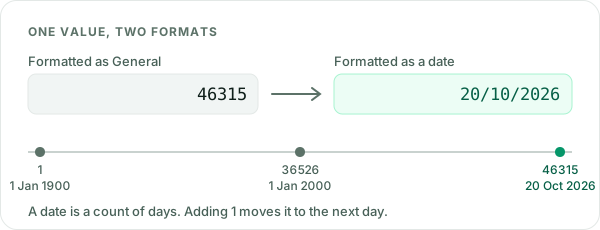
Excel stores a date as a whole number: the count of days since 1 January 1900, which is day 1. So 1 January 2000 is 36526 and 20 October 2026 is 46315. A time is the fraction of a day, so 12:00 is 0.5. This is why you can subtract one date from another to get the days between them, and add a number to move a date forward. It is also why a date can suddenly appear as a five-digit number: the value is fine, only the format has changed.
How to add days and months to a date in Excel
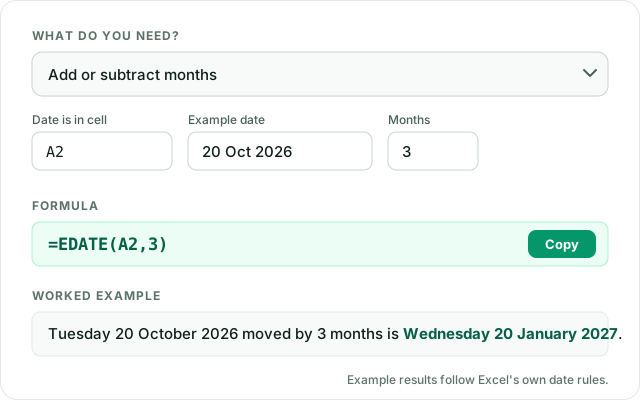
To add days, add a number: =A2+30 is 30 days later and =A2-7 a week earlier. To add months, do not add 30: months have different lengths. Use =EDATE(A2,3) for three months later or =EDATE(A2,-1) for one month earlier. EDATE keeps the day of the month, and when the new month is shorter it uses the last day, so 31 January plus one month is 28 February (29 in a leap year). For years, use =EDATE(A2,12).
How to find the first or last day of a month
=EOMONTH(A2,0) returns the last day of the month of the date in A2; change 0 to 1 for next month or -1 for last month. For the first day of the month, take the end of the previous month and add one: =EOMONTH(A2,-1)+1. The number of days in a month is =DAY(EOMONTH(A2,0)).
How to count working days in Excel
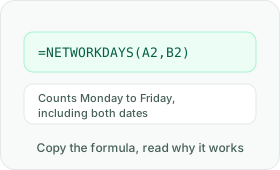
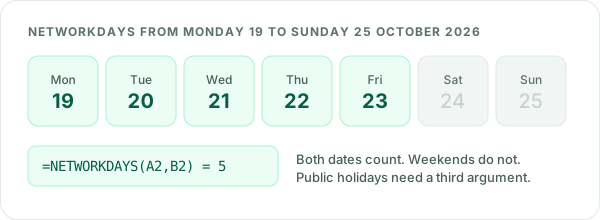
=NETWORKDAYS(A2,B2) counts Monday to Friday between two dates and includes both of them. To find the date a number of working days away, use =WORKDAY(A2,10), which does not count the start date. Neither function knows your public holidays: list them in a range and add it as a third argument, for example =NETWORKDAYS(A2,B2,H2:H12). If your weekend is not Saturday and Sunday, use NETWORKDAYS.INTL and WORKDAY.INTL, which let you choose the weekend days.
How to calculate age in Excel with DATEDIF
=DATEDIF(A2,TODAY(),"Y") gives complete years, which is an age that updates itself every day. "YM" gives the months left over after the full years, and "M" the total complete months. DATEDIF is an older function that Excel still supports but does not suggest as you type, so type it in full. Two cautions: the start date must be before the end date, or you get #NUM!, and Microsoft warns that the "MD" option can give wrong answers. For the days left over, the Date Helper uses =B2-EDATE(A2,DATEDIF(A2,B2,"M")) instead.
How to count the days between two dates
Subtract the earlier date from the later one: =B2-A2. If the result appears as a date, change the cell format to General or Number. =DAYS(B2,A2) gives the same result. To include both the first and the last day in the count, add 1.
Week numbers: WEEKNUM or ISOWEEKNUM?
=ISOWEEKNUM(A2) follows the ISO standard used across most of Europe: weeks start on Monday, and week 1 is the week with the first Thursday of the year, so 31 December 2026 is in week 53. =WEEKNUM(A2) by default starts week 1 on 1 January with weeks beginning on Sunday. Pick one and use it everywhere, because the two can disagree by a week around the new year.
How to convert text to dates in Excel
Dates imported as text look right but sort alphabetically, sit on the left of the cell and do not calculate. =DATEVALUE(A2) can convert them, but it reads the text using your computer's regional settings, so 03/04/2026 becomes 3 April on one computer and 4 March on another. The reliable way is to build the date from its parts with DATE, choosing the order yourself. The text-to-date tool above writes that formula for you. For a whole file, the Data Cleaner converts a date column in one go and flags dates that could be read both ways. Two-digit years are read by Excel as 2000 to 2029 for 00 to 29, and 1930 to 1999 for 30 to 99, unless your Windows settings say otherwise.
Why a date shows as a number or as ####
A date showing as a number such as 46315 means the cell is formatted as General or Number: change it to a date with Ctrl+1 or the number format list on the Home tab. A cell full of #### usually means the column is too narrow for the date, so widen it. It can also mean the result is a negative date, for example when an end date is before a start date.
Excel date formula cheat sheet
| You want | Formula |
|---|---|
| Today's date | =TODAY() |
| 30 days later | =A2+30 |
| 3 months later | =EDATE(A2,3) |
| Last day of the month | =EOMONTH(A2,0) |
| First day of the month | =EOMONTH(A2,-1)+1 |
| Working days between dates | =NETWORKDAYS(A2,B2) |
| 10 working days later | =WORKDAY(A2,10) |
| Age in years | =DATEDIF(A2,TODAY(),"Y") |
| Day name | =TEXT(A2,"dddd") |
| ISO week number | =ISOWEEKNUM(A2) |
| Quarter | ="Q"&ROUNDUP(MONTH(A2)/3,0) |
To practise these functions on exercises that tell you why an answer is wrong, try Excel Practice Sheets. To check any formula for common mistakes, use the Formula Checker.
Questions about Excel dates
How do I add months to a date in Excel?
Use =EDATE(A2,3) to add three months to the date in A2, or a negative number to go back. EDATE keeps the day of the month, and uses the last day of the month when the new month is shorter. Format the result cell as a date.
How do I count working days between two dates in Excel?
Use =NETWORKDAYS(A2,B2). It counts Monday to Friday and includes both the start and the end date. Add a range of holiday dates as a third argument to leave public holidays out, or use NETWORKDAYS.INTL if your weekend is not Saturday and Sunday.
How do I calculate age in Excel?
Use =DATEDIF(A2,TODAY(),"Y") for complete years. Use "YM" for the months left over. DATEDIF does not appear in Excel's function suggestions, but it works. The start date must be before the end date, or Excel shows #NUM!.
Why is my date showing as a number in Excel?
Excel stores dates as numbers, counting days from 1 January 1900, so 46315 is 20 October 2026. The cell is formatted as General or Number. Change its format to a date, from the Home tab or with Ctrl+1.
Why won't my dates sort correctly in Excel?
They are probably text that looks like dates, often from an import. Text dates sort alphabetically and are usually aligned to the left of the cell. Convert them to real dates with a DATE formula built from the parts of the text, or with the Data Cleaner.
What is the difference between WEEKNUM and ISOWEEKNUM?
ISOWEEKNUM follows the ISO standard: weeks start on Monday and week 1 is the week that contains the first Thursday of the year. WEEKNUM, by default, starts week 1 on 1 January with weeks beginning on Sunday, so the two can give different numbers for the same date.
Is the Date Helper free?
Yes. It runs in your browser, with nothing to install and nothing sent to a server. It works on Windows and Mac.